GPT Images 2.0 Comprehensive Guide: From Prompts to Full Workflow
GPT Images 2.0 Comprehensive Guide: From Prompts to Full Workflow


Introduction: As OpenAI's GPT Images 2.0 capabilities mature, image generation is shifting from "one-off output" to "systematic production." Yet in practice, the gap between users isn't about the tools themselves—but whether they master a clear, reusable methodology.
This is a hands-on guide. We break down the core applications of GPT Images 2.0—from storyboarding and character systems to marketing asset generation—and distill them into a universal prompt structure and workflow, including character anchors, editing protocols, and quality tiering—key techniques that ensure every generation serves a precise deliverable goal.
Below is the original text:
I’ve synthesized the collective wisdom of AI enthusiasts, design hackers, prompt engineers, and GPT image practitioners into this definitive guide to GPT Images 2.0—helping you progress from beginner to expert.
Storyboards, character sheets, product prototypes, social media campaigns, UI concept designs, infographics—and more—can all be generated with GPT Images 2.0.
Novices often treat it as a more powerful Midjourney, asking things like “Make me a cool comic character.” Professionals, however, build full-fledged workflows and establish reusable “anchors” (anchors).
Here’s where GPT Images 2.0 truly shines:
1. Visual Storytelling
OpenAI’s official examples already demonstrate this: whether comic panels, storyboards, or rhythmically paced sequential art, it handles them all effectively.
This nearly disrupts traditional production pipelines—for example:
· Anime-style storyboard pages with consistent character rendering
· High-conversion social carousel content
· Frame-by-frame video scripts broken down by shot
· Clear, readable comic narratives with strong pacing
These once required multi-tool collaboration, now they’re directly generatable within a single system.
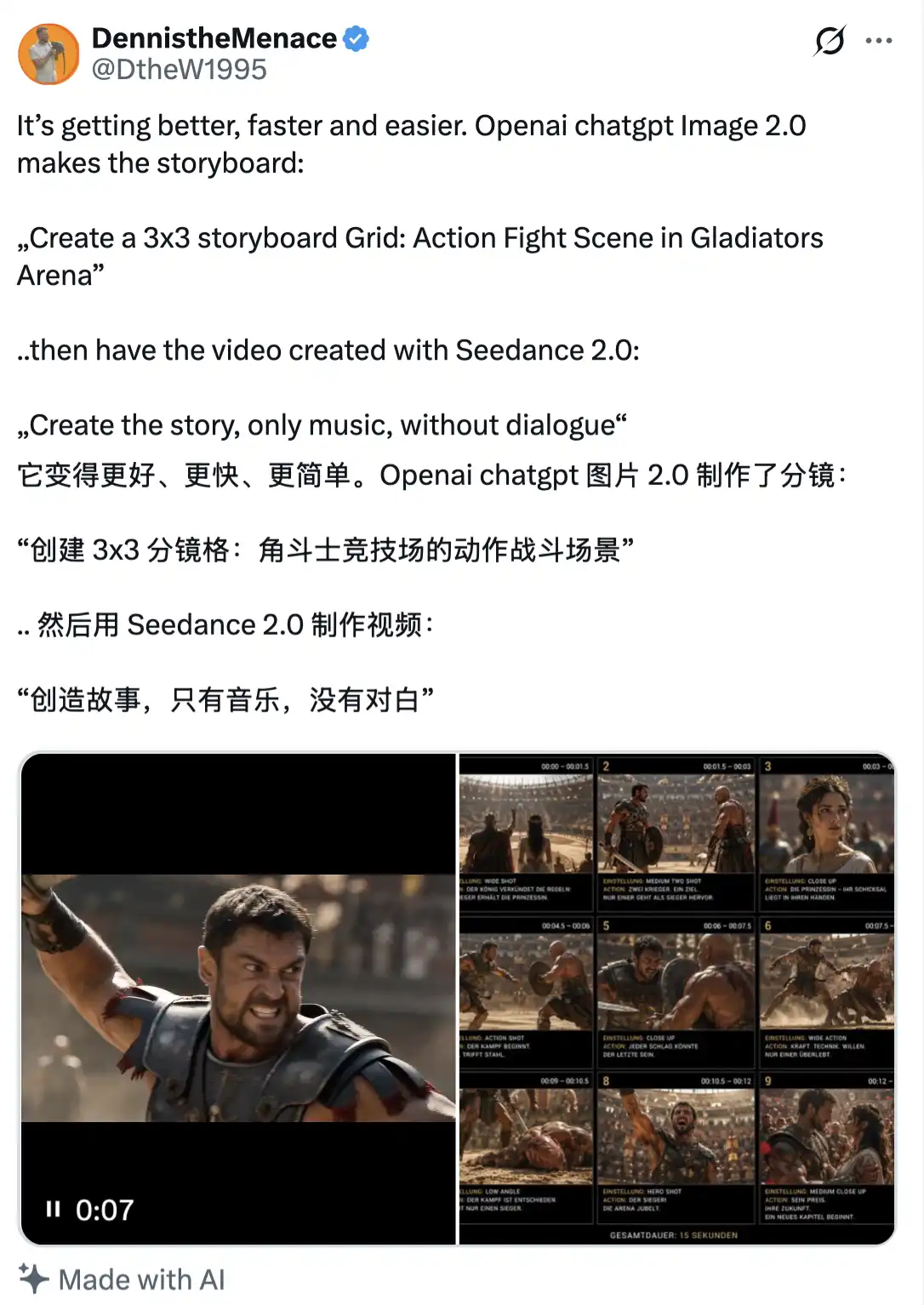
Pro users treat it like a director choreographing a scene.
2. Character Systems
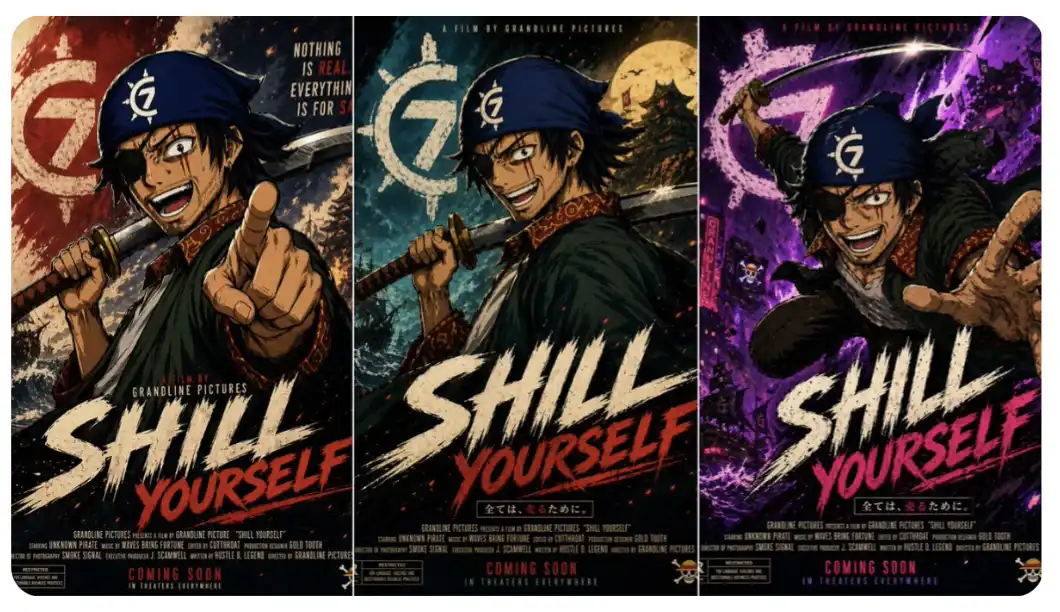
The real breakthrough: building reusable “character anchors” while maintaining identity consistency across multiple generations.
Practical applications include:
· YouTube channel mascots
· Product personas reusable across marketing campaigns
· Game character design and development charts
· Reference visuals for comic protagonists
You can create your own character (or import an existing one), then repeatedly invoke and deploy it across diverse scenes.
3. Campaigns
In official demos, OpenAI showcased Korean hotel brochures, editorial posters with fine typographic control, and complete visual layout designs.
Real-world applications cover:
· Full product launch marketing campaigns
· Brand asset libraries (Brand Asset Library)
· Social media content kits
· Presentation decks and showcase materials
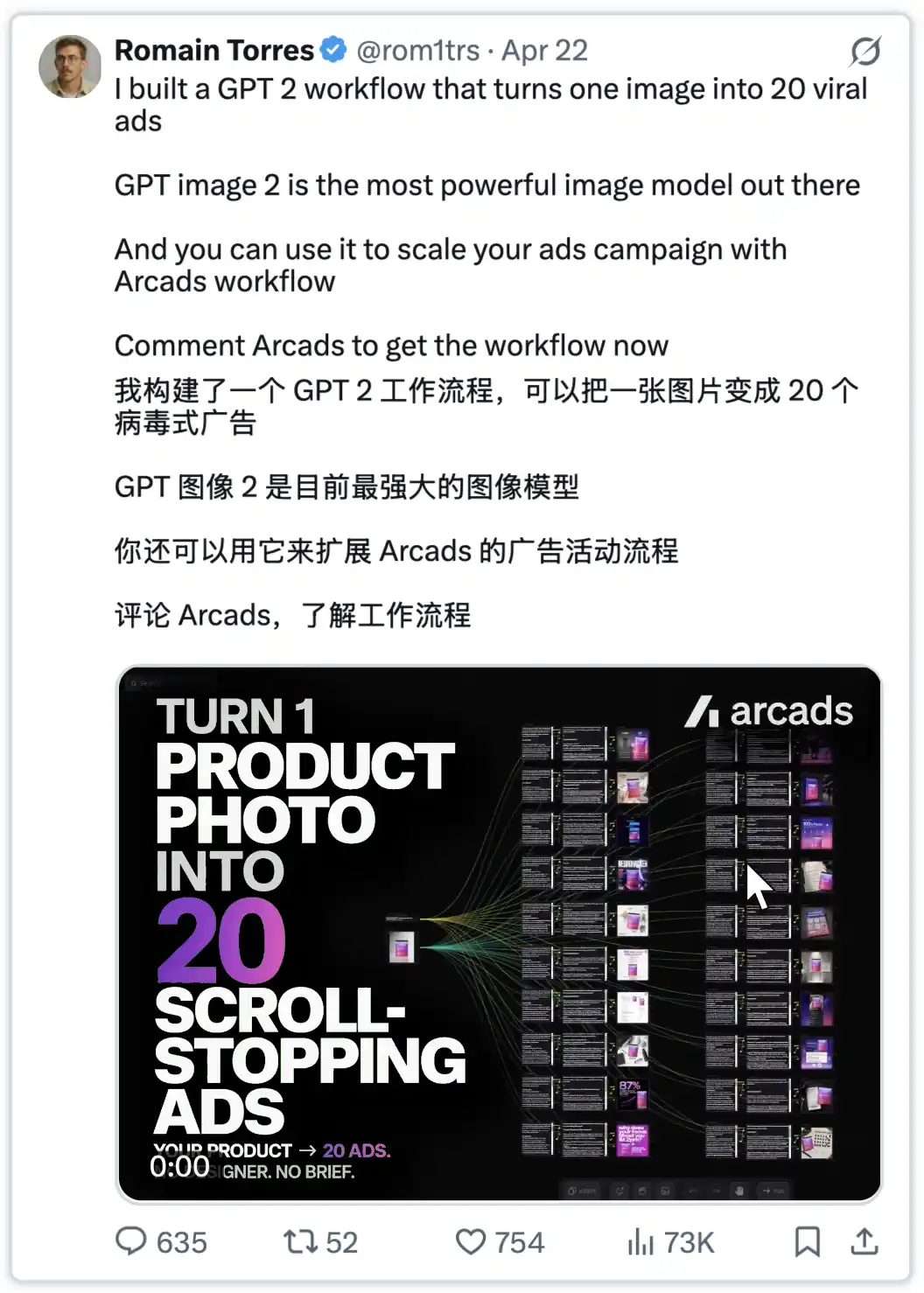
You can even generate a full brand refresh package in under 90 minutes: 12 poster variants, 8 social media content sets, 3 packaging design iterations.
Traditional cost: ~£8,000. GPT Images 2.0 cost: significantly lower.
Here’s an example:
4. Truly Effective Educational Content
Academic posters, conceptual visualizations, flowcharts—these can now be systematically generated. The official “cookbook” recommends treating such tasks as instructional design.
Common outputs include:
· Step-by-step explanatory illustrations
· Labeled process diagrams
· Classroom teaching materials
· Visualized learning guides
5. Product Development
Includes packaging design, virtual try-ons, product photography, collectible design, and more.
The key differentiator lies in prompt engineering:
· Novice: “Generate a product image”
· Pro user: “Create a high-end hero shot with luxury aesthetic, studio lighting, pure white background, product placed at a 3/4 angle”
The difference isn’t model capability—it’s precision and structural clarity in expression.
These are just a few use cases. But the real question is: how do you craft effective prompts for GPT Images 2.0?
We now dive into the core.
1. Universal Prompt Structure
Goal: [specific deliverable type]
Deliverable: [poster/storyboard/character sheet/mockup]
Scene: [environment and context]
Subject: [main focus elements]
Style: [photorealistic/editorial/anime/flat design]
Composition: [framing/layout/focal points]
Text: [exact words in quotes]
Constraints: [what stays fixed/what changes/what's forbidden]
This template forces you to articulate requirements clearly.
2. Storyboard Mastery Prompt
Goal: Create 6-panel storyboard page
Story beats:
Panel 1: [opening shot - wide establishing]
Panel 2: [character reaction - medium shot]
Panel 3: [action or discovery - dynamic angle]
Panel 4: [emotional close-up]
Panel 5: [turning point - dramatic moment]
Panel 6: [resolution - final reveal]
Character continuity: Same face, hair, outfit, proportions throughout
Style: Clean anime storyboard with professional panel layout
Constraints: One clear action per panel, minimal dialogue, no background clutter
The result? Narrative flows naturally—not just a loose collage of images.
3. Character System
Goal: Create master character reference sheet
Character: [detailed physical description - height, build, distinctive features]
Include: Front view, 3/4 view, side view, expression variations, key poses
Style: [anime/realistic/cartoon - specify consistency level]
Layout: Professional reference sheet with clear labels
Constraints: Consistent proportions, no costume variations, clean background
(Simply upload the character.) In subsequent generations, always reference this “master sheet”—adjust only pose, scene, or lighting; everything else remains unchanged.
4. Campaigns
Goal: Create [launch poster/social asset/product mockup]
Audience: [specific target demographic]
Message: [core value proposition]
Mood: [luxury/energetic/trustworthy/innovative]
Text (EXACT): "[headline]" and "[subheading]"
Typography: [modern sans-serif/elegant serif/bold display - specify hierarchy]
Constraints: Brand colours only, no extra text, strong visual hierarchy
Key detail: Enclose required text in quotation marks and explicitly demand “verbatim” presentation.
5. Advanced Tactics
Continuity System
A community-validated workflow for character consistency:
· Create a master description: focus only on appearance, not scene details
· Assign a name: e.g., “alex” or “maya” for easy referencing
· Reuse core descriptors: repeat key visual traits in later prompts
· Decouple identity from action: change pose or setting, keep character unchanged
Example master description: “maya, 28 years old, athletic build, long dark hair with blue highlights, signature green eyes, small scar above left eyebrow, typically wears a fitted black jacket”
Subsequent usage: “maya (referencing master description), sitting at a café table, laptop open, morning light environment, 3/4 perspective”
Editing Protocol
Always clarify:
· change only: what to modify
· preserve: what must remain unchanged (explicitly listed)
· keep same: elements to retain (lighting, pose, background, color)
Example: “Only replace the laptop screen with a financial chart. Preserve maya’s pose, facial expression, lighting, background, and clothing. Everything else remains unchanged.”
Quality Scaling Strategy
· Low quality: drafts, exploration, concept development
· Medium quality: social media assets, presentations, internal use
· High quality: print-ready materials, final delivery, client projects
Issue: Character drift across images → Solution: Use character anchor system + master description + repeated core details
Issue: Text appears but isn’t consistent → Solution: Shorten text, use quotation marks, specify typography, increase quality settings
Issue: Edits too drastic → Solution: Apply “change only X” protocol and list preserved elements
Issue: Output looks generic → Solution: Specify material texture, lighting, composition; avoid vague phrases like “make it look better”
Issue: Layout appears cluttered → Solution: Write prompts like a design brief—define hierarchy, spacing, and layout rules explicitly
Winning Mindset
Novices ask: “What prompt should I write?” Experts ask: “What workflow should I build to produce what I need?” The difference? Systematic thinking.
How pros use GPT Images 2.0
· Storyboard production engine
· Character development toolkit
· Marketing asset generator
· Localization amplifier
· Concept ideation accelerator
They don’t write better prompts—they build better systems.
The Most Important Point
Stop treating it as an “image generator.” Start treating it as a “visual production system.”
The real value lies in transforming ideas into deliverable assets: story-driven storyboards, scalable character designs, conversion-optimized marketing content, sales-ready product visuals, and genuinely effective material.
Treat it as a professional collaborator with clear requirements—not a creative slot machine.
Next Steps
Choose one deliverable type: storyboarding, character design, or marketing assets. Master one workflow first.
Disclaimer: Contains third-party opinions, does not constitute financial advice
Which One Is Right for You: OpenClaw or Hermes?
04-26
Prompts Cannot Salvage Mediocre AI Writing
04-26
Xchat is officially live—after the review, words fail to express.
04-25
AI "Middleman" Earns Millions Monthly? Five Questions Reveal the Truth Behind Token Arbitrage
04-23
Lobster Is History? Sorting Through Hermes Agent Tools That Can Scale Your Output 100x
04-13
10 Survival Rules for Ordinary People in the AI Era
04-08
The Golden Window for AI Entrepreneurship Has Only 12 Months Left
04-03


