
ChainThink
Stay ahead, master crypto insights
Sight AI Quick Start: Achieve Multi-Model AI Calls Compatible with OpenAI in 5 Minutes
Sight AI Quick Start: Achieve Multi-Model AI Calls Compatible with OpenAI in 5 Minutes

2025-10-21 12:14
In the field of AI development, "rapid deployment" is an eternal demand for developers — whether it's individual creators testing multi-model capabilities or enterprise teams building production-grade AI applications, "low barrier access" and "high stability calling" are indispensable. Have you ever been overwhelmed trying to call GPT-4, Claude, and DeepSeek simultaneously in a project? Have you ever had to stay up all night changing code because a major AI vendor suddenly increased API prices, limited traffic, or had unstable service? In today's era of multiple models, developers are longing for a simple, unified, and reliable solution. Today, we will introduce a tool that can completely change your workflow: Sight AI. In just 5 minutes, you can easily call global mainstream AI models with a single OpenAI-compatible API.
One, Introduction: The Pain and Dawn of Development in the Multi-Model Era
When building AI applications, we always face several core issues:
- Complex integration: Each AI vendor (such as OpenAI, Anthropic, DeepSeek, etc.) has its own unique API interface, authentication method, and return format. To use them simultaneously means you need to write and maintain multiple communication logics.
- Vendor lock-in: Once deeply integrated with one vendor, you will be bound by its pricing strategy, rate limits, and regional availability. Switching vendors comes at a high cost.
- Stability challenges: No service can guarantee 100% availability. When your primary vendor fails, how do you quickly fail over and ensure the continuity of your service?
- Cost optimization: Different tasks suit different models. A long document summary may be worth using the most powerful model, while a simple classification task may only require a lightweight model. Manually switching between different models to optimize costs is cumbersome and inefficient.
- The emergence of Sight AI is precisely to solve these pain points. It provides a decentralized AI service network, whose core is a fully OpenAI-compatible API. This means that almost all of your previous code written for OpenAI only needs to modify a base URL (Base URL) and an API Key to immediately access a smart network composed of multiple models and multiple channels.
Two, What is Sight AI?
Sight AI is a decentralized AI service network. It allows your requests to be intelligently routed to faster, cheaper, and more stable upstream model channels (such as OpenAI, Claude, DeepSeek, and various open-source models) through a unified, OpenAI-compatible API entry point.
For you, this means:
- Simpler development: Only integrate one API.
- Better cost efficiency: The system automatically selects more cost-effective channels for you.
- Higher stability: Single-point failure becomes history, and requests will automatically retry and fallback when they fail.
- More freedom of choice: No longer bound by any single vendor.
Three, Five-Minute Quick Start
The theory is done, let's start with practice. (Introductory video demo: https://www.bilibili.com/video/BV1z5H6zDEmC/)
✅ Step One: Install MetaMask
1. Open Chrome and visit: https://metamask.io/
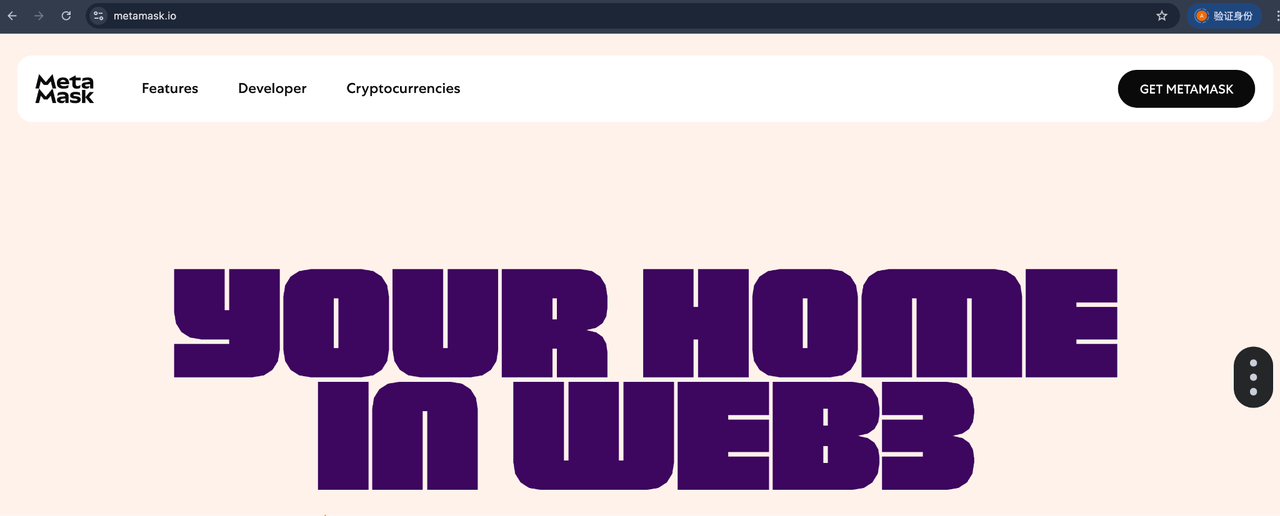
2. Click on the top right corner "Get MetaMask"
3. It will redirect to the Chrome App Store page, click "Add to Chrome"
4. Confirm in the pop-up window and click "Add extension"
5. After installation, create a new wallet
6. Pin MetaMask to the browser toolbar to complete the wallet.
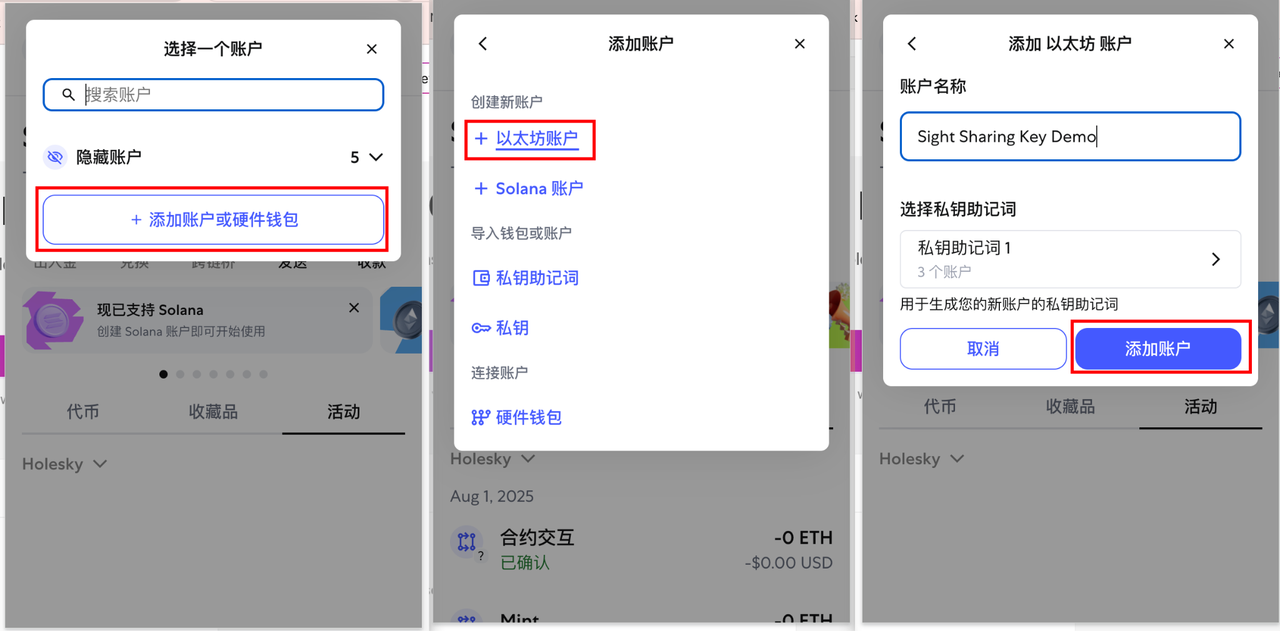
✅ Step Two: Claim Holesky Testnet ETH
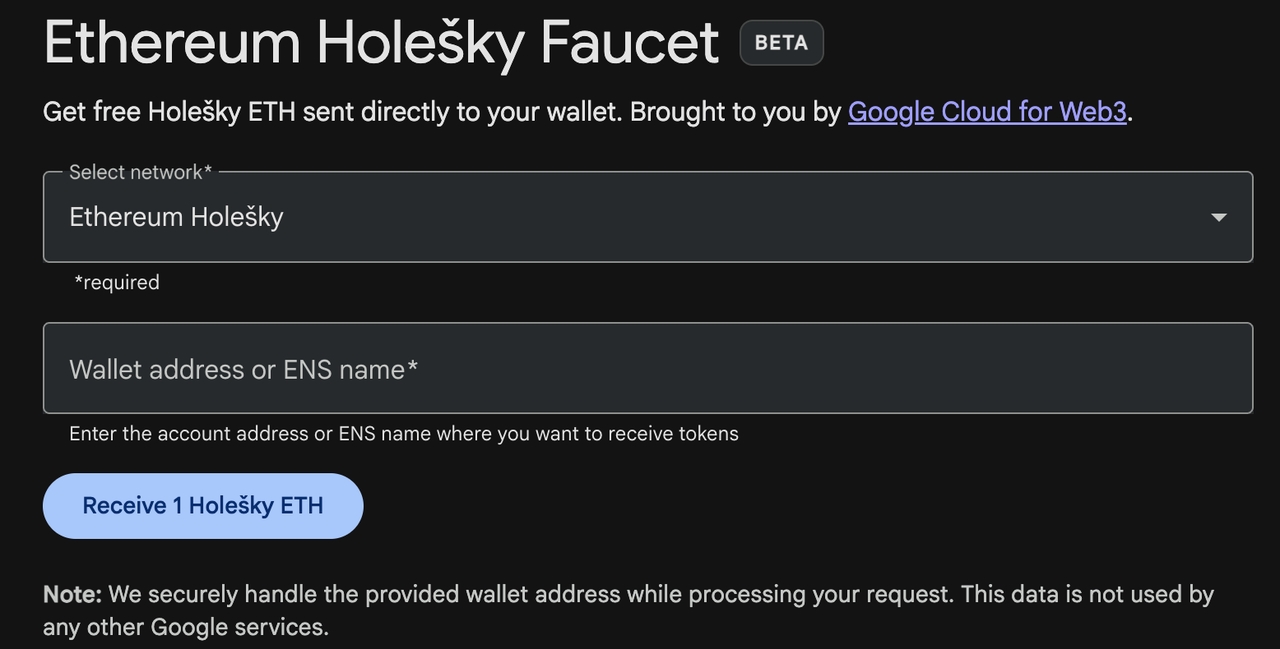
- Visit the test faucet: 👉 https://cloud.google.com/application/web3/faucet/ethereum/holesky
- Copy your MetaMask wallet address
- Click "Receive 1 Holesky ETH" (claim 1 Holesky ETH)
✅ Step Three: Mint Test Token (USDC)
1. Go to: 👉 http://gateway.benchmark.sightai.io/susdc-test
2. Connect your MetaMask wallet
3. Click "Auto Obtain 1000 USDC" (mint 1000 USDC)
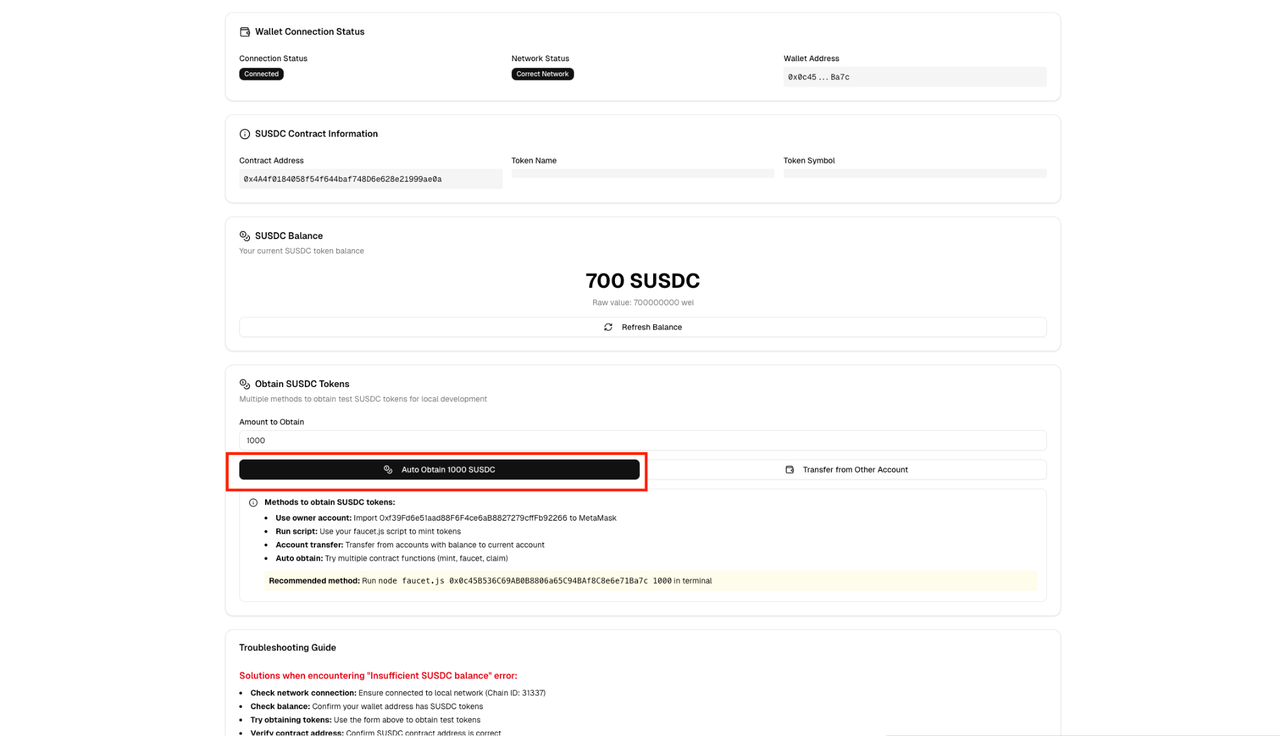
4. Approve the transaction in MetaMask, wait 1–2 minutes, after which you will see the balance displayed
5.note: If you cannot mint, contact the team to get test tokens
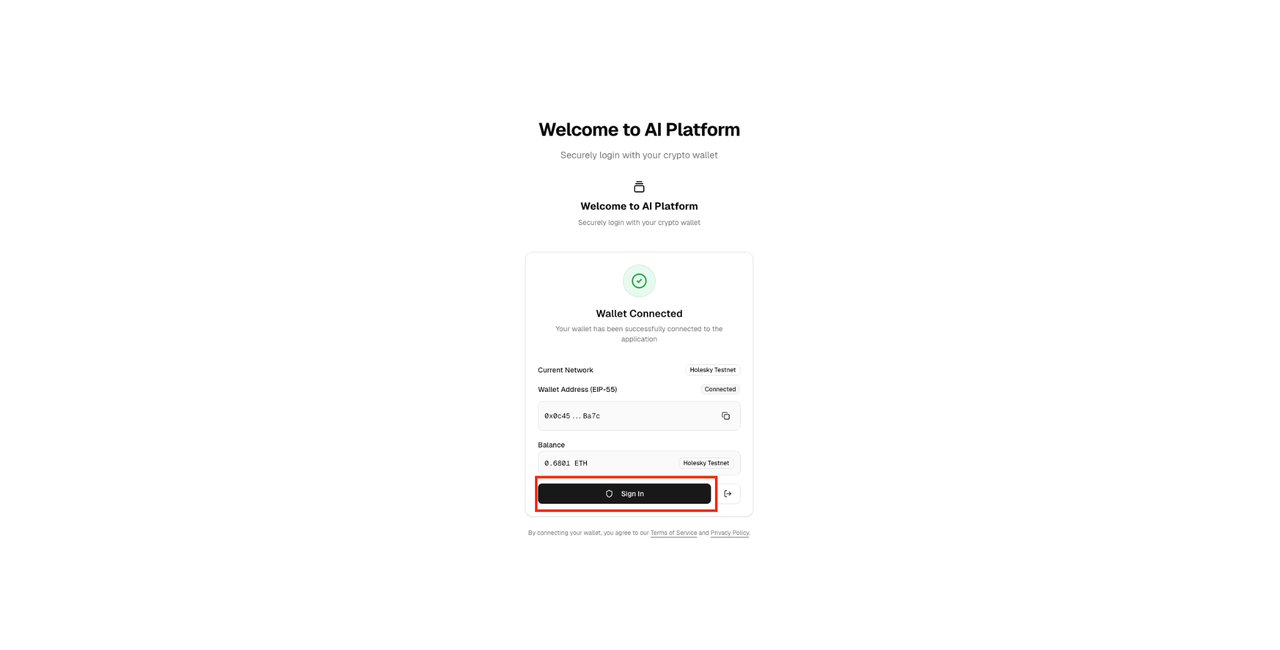
✅ Step Four: Connect Wallet to Sight Platform
1. Visit Sight Homepage: http://gateway.benchmark.sightai.io/user/api-keys;
2. Click connect your MetaMask wallet;
3. After connecting, click "Sign in" button to complete wallet confirmation.
✅ Step Five: Stake Test Tokens
- After logging in, click the "User" button on the top right;
- Click Billing (Billing) in the sidebar, then click Deposit (Deposit/Stake);
- Here you can see your current USDC balance, enter the amount in the input box below, click Next Step (Next Step), then click Authorize USDC (Authorize USDC);
- Approve the transaction (authorize + deposit) in MetaMask, wait about 1 minute, it will prompt that the transaction is completed, and the deposit is successful;
- About 2–3 minutes later, your balance will be displayed in the top left.
✅ Step Six: Generate Your Sight API Key
- Click API Keys on the left sidebar, then click Create New Secret Key (Create New Key)
2. Enter a name for the key, click Next (Next), then click Create (Create)
3. After creation, click Copy (Copy) to save your API Key. At this point, you can see the key you have created on the list page.
✅ Step Seven: Deploy Open WebUI
Install according to the official guide:
👉 https://github.com/open-webui/open-webui
Make sure Docker and ollma are running, first log in to GitHub Container Registry (GHCR):
docker login ghcr.io
- Username (username): your GitHub username
- Password (password): GitHub personal access token (not your GitHub login password)
- 📌 Steps to generate access token:
- Visit: https://github.com/settings/tokens
- Click "Generate new token (classic)"
- Select read:packages
- Copy the token (displayed only once)
- Then pull the image (if using a VPN service, copy the terminal proxy before entering the command again):
- docker pull ghcr.io/open-webui/open-webui:latest
- Enter the following command again
- docker run -d -p 3000:8080 -v open-webui:/app/backend/data --name open-webui --restart always ghcr.io/open-webui/open-webui:dev
- Open in the browser: http://localhost:3000/
✅ Step Eight: Connect Open WebUI to Sight AI
- In openwebui, click the admin panel in the lower left corner and then click settings at the top:
- Click External Connection
- Enter the corresponding URL and key
- URL: http://gateway.api.benchmark.sightai.io/v1 API Key: paste the key you created in step six
- 🎉 All set! Now you can use Sight AI + Open WebUI to explore decentralized reasoning!
Four, Common Issues Troubleshooting (Why It Doesn't Work)
When you first connect, you may encounter some small problems. Here are common errors and solutions:
- 401 Unauthorized Reason: Almost 100% due to incorrect API Key or incorrect authentication header format. Solution: Carefully check if your API Key is copied completely, confirm it is in sk_xxx format. Check if the request header (Header) in your code is correct: must be Authorization: Bearer <your API Key>, note that there is a space after Bearer.
- 404 Not Found Reason: Incorrect URL path. Solution: Confirm that your BaseURL is correctly concatenated. The full address should be https://<your-gateway>/v1/chat/completions.
- 429 Too Many Requests Reason: Your request frequency exceeds the current plan or rate limit settings. Solution: Reduce your request concurrency, or add a retry mechanism (e.g., exponential backoff algorithm) in your code.
- 5xx server error or timeout Reason: SightAI gateway or upstream model service temporarily fails or network instability occurs. Solution: This is where the value of SightAI shines! You don't need to do anything. The intelligent routing system of SightAI will automatically detect this failure and reroute it to another healthy upstream channel. Your client code only needs to set a reasonable timeout and implement a retry logic.
Five, Summary and Outlook
At this point, you have mastered the most core and basic skills of using SightAI: calling through an OpenAI-compatible API. You can now immediately start modifying your existing projects, simply replacing the original Base URL and corresponding Key pointing to api.openai.com with those of SightAI. You will find that the door to the world is now open, no longer restricted by a single vendor.
But this is just the tip of the iceberg of SightAI's powerful capabilities. In the next article, we will delve into:
- How to cleverly use intelligent routing to specify the model via the model parameter or let the system automatically select the optimal model.
- How to integrate streaming transmission (Server-Sent Events) to achieve a typewriter effect similar to ChatGPT, improving user experience.
- How to leverage BYOK (Bring Your Own Key) functionality in enterprise-level applications to achieve the highest level of security control.
- Even how to become a provider and share your idle API quotas to earn income.
- The philosophy of Sight AI is to make AI calls as simple and reliable as electricity — you only need to care about "using electricity" (calling AI), not where the "electricity" comes from (model supplier). Now, you have plugged in the power, and it's time to create freely.
- Sight AI is currently seeking seed users, come apply to become one of the first 5000 users to get free API credits from SightAI 🎉
- Application address 👉 https://ujp8i84zazfl.jp.larksuite.com/share/base/form/shrjpx2HMJ70gZ4KnC0QOBF3uTe
- We will gradually grant access to the waiting list users and keep you updated via email or system notifications.
- Welcome to join the Sight AI technical community to participate in discussions
- Social media accounts:
- X: https://x.com/theSightAI
- Github: https://github.com/sight-ai
- Discord: https://discord.gg/Qftd6QJ4
Disclaimer: Contains third-party opinions, does not constitute financial advice


AI Practical Guide
This column focuses on the real progress of Agents: technological evolution, application implementat

Crypto Weekly
Tracking on-chain movements of the smart money and institutions

Frontier Insights
Spotlight on Frontier, trending projects, and breaking events

Blowup Alert
As the 2026 crypto bear market deepens, exit scams and project blowups are becoming increasingly fre

Regulatory Watch
American Crypto Act – timely interpretations of policies worldwide

Popular Airdrop Tutorial
Selected potential airdrop opportunities to gain big with small investments

FusnChain
FusnChain